It's not a person who manages your passwords.
Password managers are simple, user-friendly database systems that store account credentials for easy-access when logging in to your various accounts. The original password managers look a lot like what my grandmother uses to this day — several sheets of paper with printed usernames, emails and passwords.
The modern day systems are just a touch more advanced in a few areas, so I'll be going over the advantages.
Trusting the Pros
When I was in one of my network security courses back in my college days, a tangential conversation about passwords led to my professor giving the class a piece of advice that stuck with me: he advised that we were better off using a mainstream platform's online data service than keeping a password list stored locally on our devices.
At first I thought this was strange, seeing as how an online system's protection is left up to strangers. Why put my sensitive account data directly into the hands of people I didn't know? Once he elaborated, his justification came in that a service provider like Google is going to have better data security than that of a random PC owner in their home. Now it made sense.
There are far better options than keeping a Google Sheet full of passwords, but this is the philosophy to have when choosing to hand data over to a password manager: leave it to the pros.
The Major Players
PMs are very accessible on most devices; you've likely seen them suggest saving your passwords while you're on your phone or desktop. Usually after a login, a small pop-up will ask if you'd like to store the password so that next time you visit this account, your credentials will autofill.
Apple has the iCloud Keychain, Google has its own Google Password Manager, Firefox similarly has its own, amongst many others. These are helpful in that they present themselves while you're already using their main service — like when on your iPhone, or browsing on Google Chrome.
Alternatively, you can take advantage of third-party password managers that function independently of your device/browser. This is the approach I use with NordPass, since I'm already in the Nord ecosystem with their VPN.
The Highlights
A PM will protect your credentials with high-level encryption. A quick Google search reveals that they typically use AES-256 (Advanced Encryption Standard with a 256-bit key). I don't know every detail of the algorithm's strength, but this is a trustworty encryption standard.
Once you enter a username and password into a PM, it will let you know if your password is weak and even offer to generate a strong replacement.
When reaching a login page for an account that's been saved to your PM, you'll automatically be presented with the option to seamlessly autofill — no need to jump to another page or app.
Many of these offer both free and paid tiers that allow you to extend their functionality if need be. Personally, I stick with NordPass's free tier and get all the convenience I need.
Incredibly Convenient for the Modern Day
I swear that every single service and website asks me to make an account. I try my best to keep this to a minimum as not to expose my email address to too much spam and marketing, but it can't always be helped.
Trying to remember every password just isn't an option anymore. Even if it were just the essentials — accounts for banking, school, work, shopping — it adds up too quickly to be feasible. Plus, password creation requirements will likely continue to get more complex.
Tracking them on a spreadsheet can work, but jumping back and forth to copy-and-paste can be obnoxious, especially when you consider that not all platforms allow pasting into password fields. Not to mention that a plain spreadsheet isn't a very secure storage method.
Tracking physically in a notebook or on some paper isn't vulnerable to a data breach in the same ways, but are you going to remember to carry that around with you at all times? What happens if you lose it?
PMs solve all of these issues and with a high degree of security — this convenience alone makes it a worthwhile tool.
My Thoughts & Feelings
I used to partake in some subpar practices; password reuse, weak passwords, and insecure tracking. Thankfully, I haven't been a victim of a cracked password, but I didn't want to leave it to chance.
I started using NordPass in 2025 and have been thoroughly enjoying its features. On my phone, I can access and add to my PM via the service's app, and on my desktop, it's a browser extension for Chrome. I only need to remember a single "master" password to unlock the manager as a whole and then the autofill is immediately available.
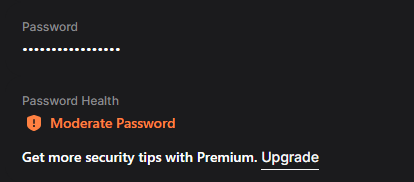
Like I wrote earlier, I've only ever used the free tier, but Premium adds on some advanced tools to check for data breaches, apply email masking, and more. Maybe someday I'll give it a try and write a follow-up article on the differences. The free tier does include a password health checker, but I assume it's a little more in-depth in Premium.
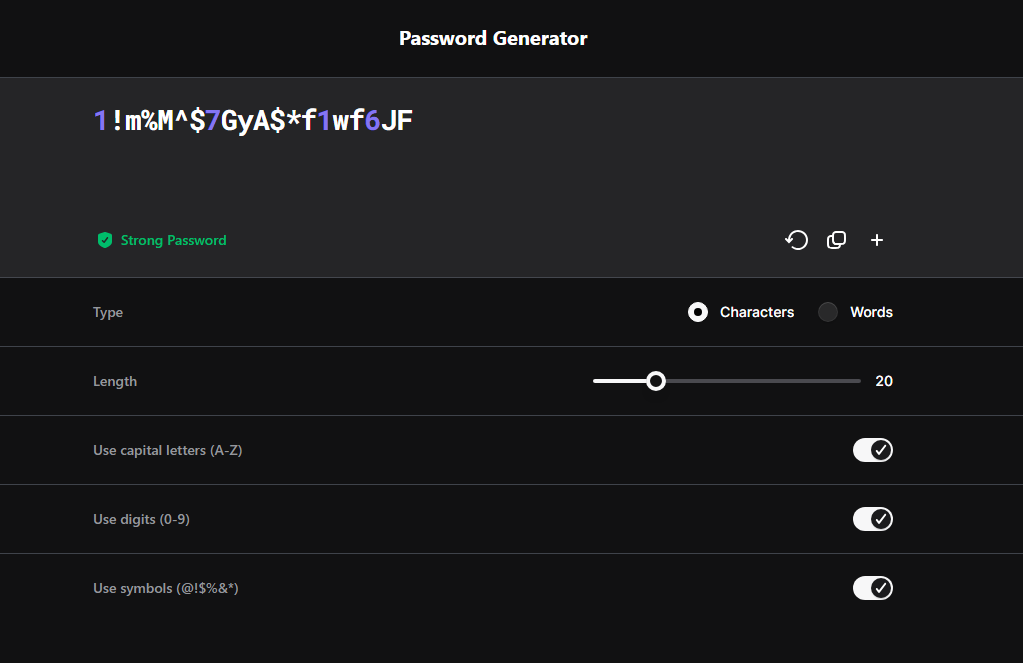
It also includes a Password Generator that lets you create a unique, strong password based on severable configurable parameters, giving you access to very secure login details, and the autofill allows their use without needing to memorize a super-complex string. Just look at this thing:
If you asked me ten years ago, I probably wouldn't have made the case that a PM was necessary. In this day and age the internet is littered with services, businesses, and platforms that require account creation. I doubt I'll ever go without one again.
Personally, I think the peace of mind and ease of use are well worth the initial learning curve. Protecting your passwords and data is an ongoing practice; new threats emerge everyday and you certainly don't want to wait until after you've been the victim of an attack to improve your security habits.
Technology evolves constantly, and with it, so do the bad actors looking to make a quick buck by selling your information. I would highly suggest moving your antiquated password lists into a password manager.
March 15th, 2026